
Device Return That Actually Closes the Loop
End-of-year collection, graduation check-in, device refresh — scan every Chromebook back in, auto-match it to the right student, track chargers and condition, and invoice for what's missing. No spreadsheets. No mystery losses.
Why You Need This
Collection week shouldn't be chaos
Cardboard boxes of Chromebooks. A shared spreadsheet that three people are editing at once. Sticky notes for "this one's missing a charger." And in September, a pile of devices nobody can tie back to a student — and a list of "lost" laptops that quietly become a budget line. There's a better way.
UserAuthGuard turns end-of-year collection into a scan-and-reconcile workflow. Open a collection, scan devices as they come back, and the system matches each one to the student on your roster automatically. You always know — to the device — exactly who has returned and who hasn't.
How device return works
Create a collection — and choose what to capture
Pick the school, name the drive ("EOY Return 2026"), and toggle on exactly what you want to record per device: charger returned, condition (Good / Damaged / Broken), accessories, and optional charger-fee invoicing.
Scan devices back in
Scan the barcode or type the serial / asset ID. Each device drops into the collection instantly. The scanner prompts only for the things you turned on — no irrelevant clicks.
Auto-match to the student roster
Every scan is matched against the student it was assigned to. Devices that don't match a student on this school's roster — loaners, transfers, strays — are surfaced in their own bucket so nothing slips through.
Reconcile the whole roster, live
The by-student view shows every student with a Returned / Not Returned status and the device you expect back. Filter to exactly who you need — not returned, charger missing, damaged — and message those students in one click.
Invoice and export
Bulk-invoice students who returned a device without its charger, then export the whole collection to CSV or Google Sheets for finance, insurance, or the board report.
See it in action
This is what your team sees while a collection is running — no mockups, this is the real workflow.
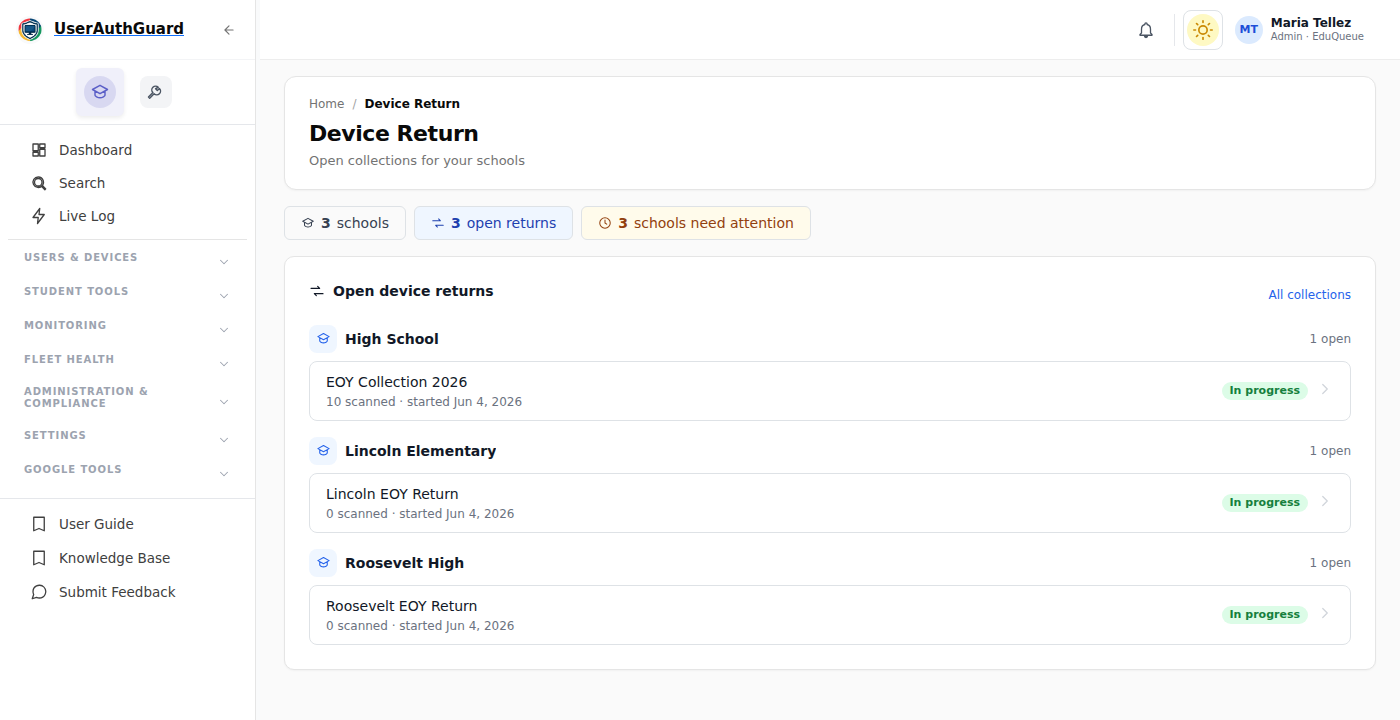
The dashboard: every school you cover and its open collections, in one place.
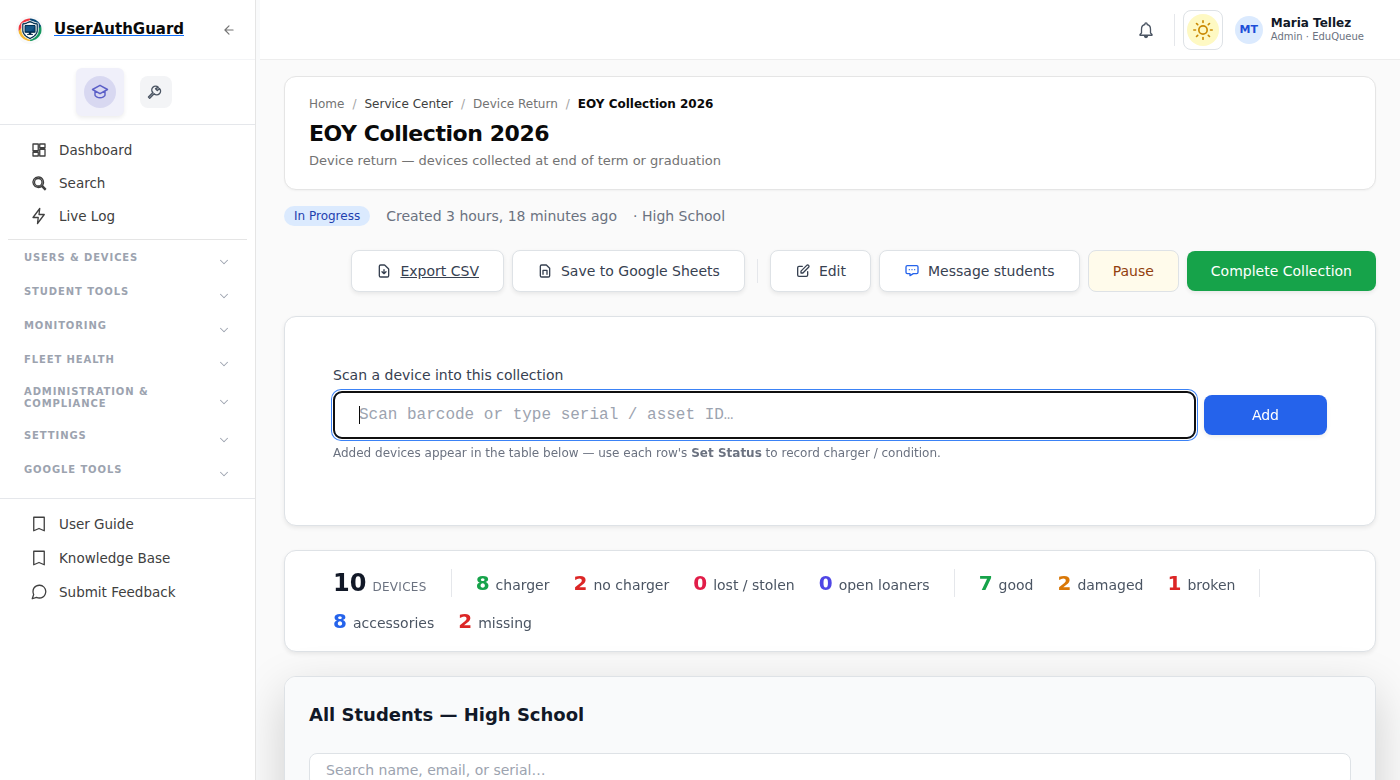
Inside a collection: scan a device in, and live tallies for chargers, condition, and accessories update instantly.
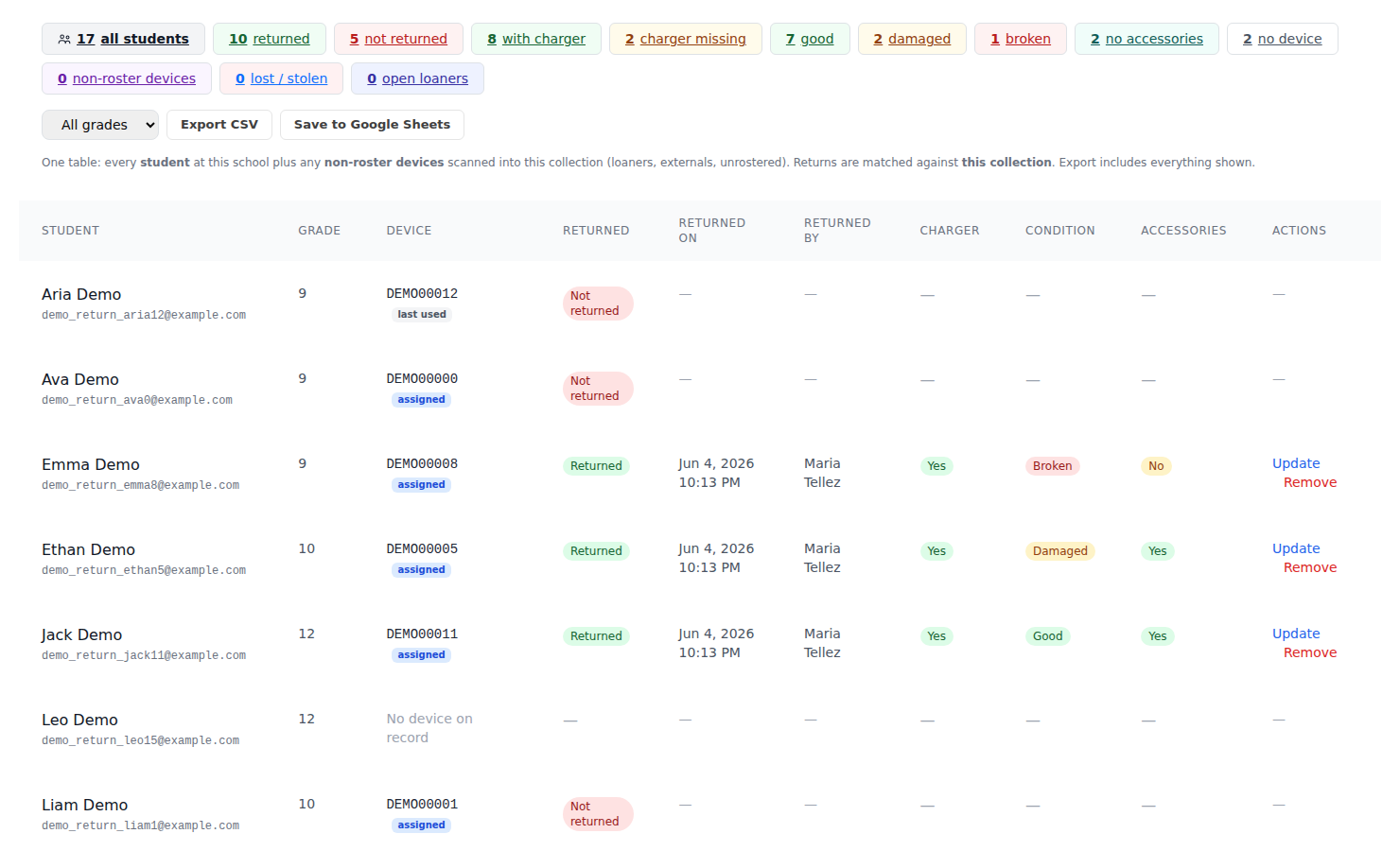
The by-student view: who's returned, who hasn't, and the condition of every device that came back. One click filters to exactly the group you need to chase.
Capture exactly what you need
Every collection is configurable. Turn on the columns and prompts that matter for this drive — the table and filters adapt to match.
Record whether each device came back with its charger. Get a live "with charger / charger missing" count and an instant list of who owes one.
Mark each return Good, Damaged, or Broken. Filter straight to the damaged and broken devices that need to go to repair.
Track cases, styluses, and chargers as a set. Flag anything returned without its accessories.
Set a per-collection charger fee. Any "charger missing" return gets an Invoice action — bulk-invoice the whole list when you're done.
Give it to the people doing the work
A dedicated, scan-only Device Return role
Hand collection week to aides, librarians, or seasonal staff without giving them the keys to your whole console. The Device Return role is assigned to specific schools and does exactly one thing: open the collections for its schools and scan devices in. No tickets, no settings, no student data beyond the roster they're reconciling — they show up and scan.
Spreadsheets vs. real device return
| During collection week | Spreadsheet + boxes | UserAuthGuard |
|---|---|---|
| Match each device to its student | Manual, error-prone | Automatic on scan |
| Know who hasn't returned — right now | Sort & cross-reference later | Live, filterable |
| Track charger & condition per device | Extra columns, never filled in | Prompted at scan |
| Catch loaners & non-roster devices | They just disappear | Surfaced separately |
| Invoice for missing chargers | A separate manual chase | One-click, bulk |
| Message the students still holding devices | Build a mail-merge | Built in |
| Hand the work to non-technical staff safely | Share the whole sheet | Scan-only role |
A spreadsheet tells you what you typed. Device return tells you what actually came back.
- ✓ End the September mysteryWalk out of collection week knowing exactly which devices are out and who has them — not a vague "lost" count.
- ✓ Recover real moneyCharger-fee invoicing and damage tracking turn "we lost a bunch of stuff" into an itemized, recoverable list.
- ✓ Collect at the speed of a scanNo data entry bottleneck. Scan, confirm charger and condition, next device — a few seconds each.
- ✓ Staff it without riskThe scan-only Device Return role lets aides and volunteers run a school's collection without touching anything else.
Common Use Cases
End-of-year 1:1 collection
Bring the whole fleet back in June. Reconcile every grade against the roster, chase the stragglers by name, and hand finance a clean condition-and-charger report.
Senior & graduation checkout
Clear graduating students device-by-device. Instantly see which seniors still owe a Chromebook before you sign off on their clearance.
Summer device refresh
Collect, assess condition, and route damaged and broken devices straight to the repair queue — all from the same scan.
Frequently Asked Questions
How does Chromebook device return work in UserAuthGuard?
Create a collection for a school, choose what to capture (charger, condition, accessories), then scan each Chromebook's barcode or serial as it comes back. Every scan auto-matches to the student it was assigned to, so the dashboard reconciles who has returned and who hasn't — live, with no spreadsheet to merge.
Can I see exactly which students still have a device out?
Yes. The by-student view lists every student at the school with a Returned or Not Returned status and the device you expect back, plus one-click filters for not returned, charger missing, damaged, broken, and more. You can message the not-returned students directly from that screen.
Can we charge students for missing chargers?
Yes. Turn on charger-fee invoicing for a collection and set a fee. Any device returned without its charger gets an Invoice action, and you can bulk-invoice every charger-missing student at once.
Do we need a special barcode scanner?
No special hardware required. Any USB or Bluetooth barcode scanner works, or you can type the serial / asset ID. Devices scanned in that aren't on the roster — loaners, transfers, strays — are surfaced separately so nothing goes missing.
Can non-technical staff run collection without full admin access?
Yes. The dedicated Device Return role is assigned to specific schools and can only open those schools' collections and scan devices in — no tickets, settings, or other student data. It's built for aides, librarians, and seasonal collection staff.
Is device return free?
No — Device Return is a paid UserAuthGuard module, priced à la carte. UserAuthGuard's free tier gives you read-only visibility of your whole fleet — every device, user, and OU, plus assignment-gap reporting — with no device cap. See userauthguard.com/pricing/ for details.
Make this the last collection week you dread
Scan devices back in, reconcile every student, and recover what's missing. Device Return is a paid module, priced à la carte — start free to see your whole fleet first.