Move from reactive recovery to proactive stewardship — where every lost device is a dollar reclaimed, not written off.
No credit card required · FERPA & COPPA Compliant · Zero-Trust Architecture · Works with Google Admin
Every district sits somewhere on this line. Most are stuck in the first two stages and can’t put a number on what it’s costing them. The leaders have moved.
Device loss isn’t a kid problem — it’s a governance gap. You can’t fix what you can’t see, and a spreadsheet can’t see it.
Device identity becomes the policy. Each Chromebook is bound to its own OU — accountability without agents, proxies, or student surveillance.
Every device accounted for, every assignment audit-logged, every loss investigated. The refresh budget stops leaking.
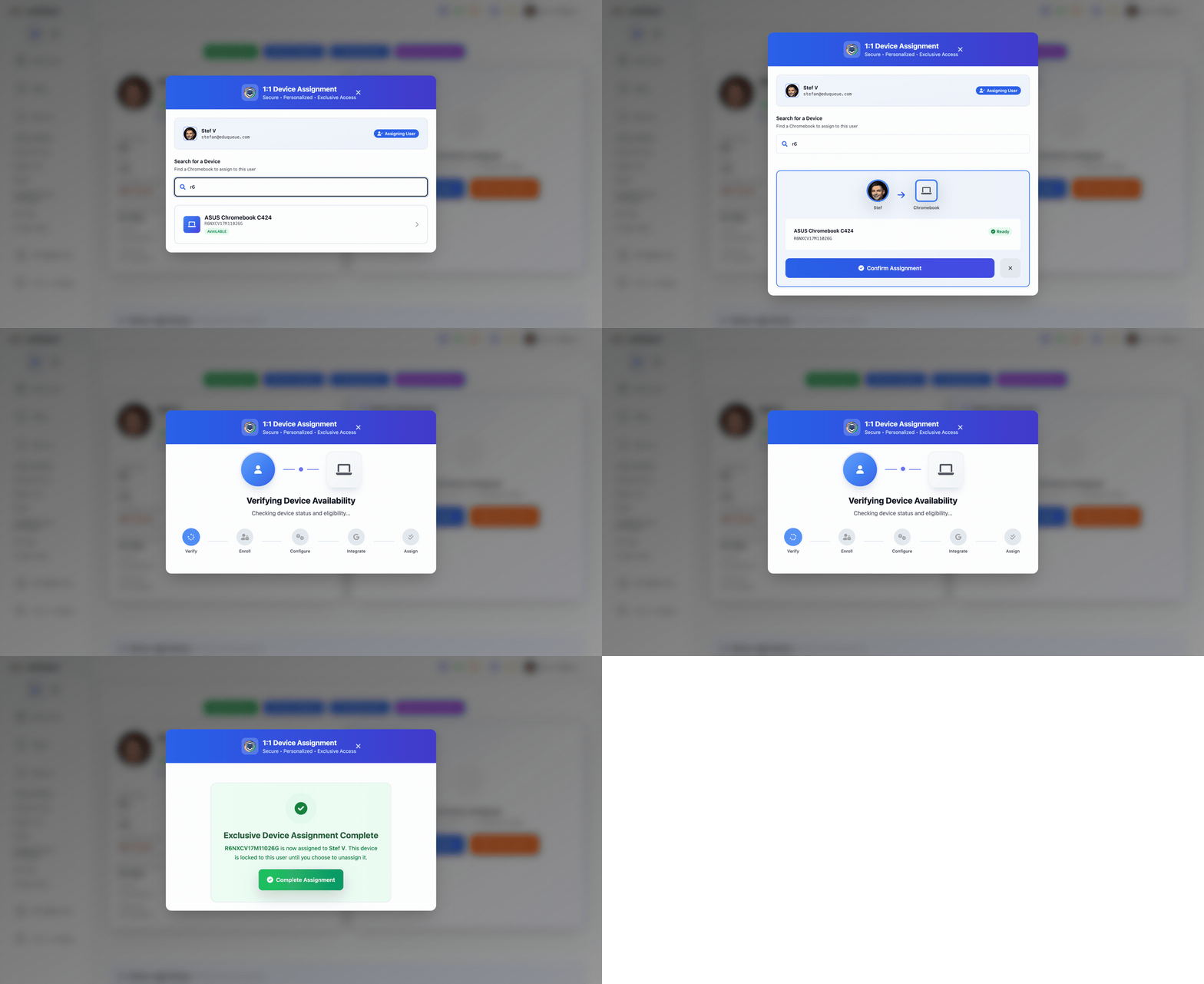
Each Chromebook gets its own organizational unit, bound to one student. Move the device, the policy follows. Lose the device, the audit trail is already there. No spreadsheets, no rolodex of who-has-what.
Pick your seat. See what changes day one.
Real-time inventory synced with Google Admin. One-click lost mode. Full device accountability.
Device identity enforcement, 1:1 assignment, automated compliance, and OU-level security.
Three steps from deployment to automated compliance — no agents, no surveillance, no complexity.
Each Chromebook is assigned a dedicated Organizational Unit in Google Workspace. The device's identity becomes its security policy — no user action required.
OU-Lock enforces security policies at the Google Workspace level. Filtering rules, app restrictions, and network policies stay applied — even if someone tries to move the device.
Whoever has the device gets the correct security policies. No manual configuration per user. No agents to install or maintain. Compliance without trusting people — zero burden on anyone.
Unlike agent-based tools that install software on every device and rely on monitoring student behavior, UserAuthGuard secures devices at the infrastructure level. Security is enforced by architecture, not surveillance.
Stages 3 and 4 aren’t a dashboard you buy — they’re a loop you run. This is the loop: check device health, run the campaign, keep students engaged in caring for their own device.
Students walk a guided self-check each month — keyboard, screen, speaker, battery — and earn points and streaks for keeping their device healthy. Honest damage reports are rewarded, not punished. No agent, no IT ticket.
Push a refresh or return campaign to any group — a school, a grade, a serial list — across a date window. It escalates on its own: silent reminder → notification → banner → lock, until every device is checked in or accounted for.
Points, streaks and milestones turn device care into something students actually do — clean returns, on-time checks, honest reporting. Optional Enterprise screen-time analytics are admin-only and opt-in.
You're losing
per year
UserAuthGuard could save you
(75% reduction in device loss based on customer data)
Verbatim quotes from customers. We don’t attach before/after numbers they didn’t give us.
“UserAuthGuard has saved our team several hours each week by eliminating the need to manually investigate device usage and ownership in Google Admin logs.”
“I would absolutely recommend UserAuthGuard to other districts. If you need to keep track of your devices and you’re using Google Admin, it’s a no-brainer.”
The full four-stage model, a five-question self-assessment, and the concrete moves between each stage — the same framework on this page, in a one-pager you can take to a board meeting.
How districts move from reactive recovery to active stewardship — and what it takes.
UserAuthGuard is the #1 Chromebook management platform for K-12. It provides 1:1 device assignment, real-time tracking, instant lost mode, check-in/check-out, and visual Google OU management. Schools see a 75% reduction in device loss.
Each Chromebook gets a dedicated OU and is linked to a specific student. Our patent-pending OU-Lock ensures clear accountability — students know which device is theirs, IT can track who has what. Assignment takes seconds.
UserAuthGuard syncs with Google Admin in real-time. When a device goes missing, activate lost mode with one click — it displays a recovery message with your school's contact info. See the assigned student and last sync time instantly.
It tracks when students receive and return devices. Scan a barcode, assign to a student, and the system records the full history. At year-end, check devices back in with a complete audit trail of who had each device and when.
With UserAuthGuard's Visual OU Explorer, select multiple devices, click "Move to OU," and choose your destination. What takes 30+ minutes in Google Admin Console takes 30 seconds with bulk OU management.
Clear 1:1 assignment means students know they're responsible for their specific device. Real-time tracking, instant lost mode, and visible checkout history create accountability that prevents loss. Districts see 75% less device loss.
Yes. UserAuthGuard is free to see your whole fleet — read-only visibility of every device, user, and OU, plus assignment-gap reporting. No device cap, free forever, no credit card. Blocking, enforcement, and classroom monitoring are paid modules, priced à la carte.
Complete asset tracking: warranty status, repair history, assignment records, and fleet analytics. Sync your entire fleet from Google Admin, see which devices need attention, and generate audit reports — all in one dashboard.
Security policies enforced by device identity, not user trust or installed agents. UserAuthGuard's patent-pending OU-Lock binds each Chromebook to a dedicated Google OU. Nothing to install, nothing to tamper with, nothing for IT to maintain per device.
Filters monitor what students do. UserAuthGuard secures the devices themselves — who has them, where they belong in your OU structure, and that policies stay applied. They're complementary. Many districts run both together.
The core platform does not monitor student activity. OU-Lock secures devices at the infrastructure level — no agents, no screen capture, no browsing history tracking. It's a completely separate technology from monitoring.
For districts that want visibility, UserAuthGuard offers a classroom and safety extension — a paid add-on, priced à la carte, with real-time classroom screen view, screen time analytics, content blocking, and keyword alerts. It deploys via Google Admin and only runs during school hours. This is entirely separate from the core platform.
Connect Google Admin and see every device, every assignment gap, and what it's costing you a year — free forever. Pay only to enforce it.
See your whole fleet free — every device, every gap, the yearly cost. No credit card. No agents. Pay only to enforce it.
See your whole fleet free • No credit card required • Works with Google Admin
